How to Automate AWS Startup and Shutdown: Setup Procedures, Selection Guide, and Points to Note
- aws
- Amazon EC2
- Operation automation



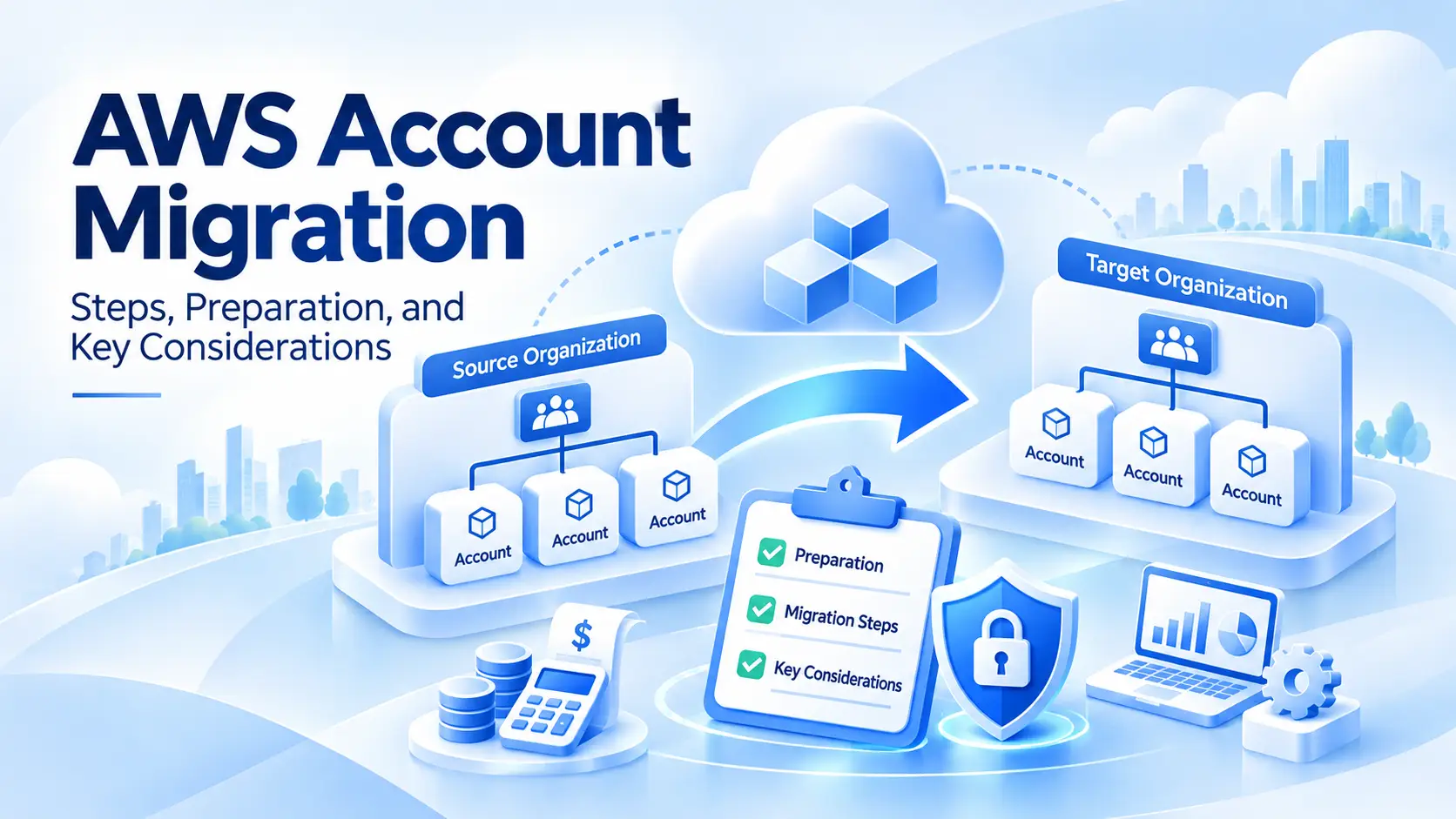
When changing AWS management companies or reorganizing your organization, you may need to transfer your AWS account. However, in some cases, it may only require a change in administrative permissions and billing information.
The procedures and considerations differ when transferring accounts between AWS Organizations and when migrating resources to a different account. Since this also affects access permissions, billing, and security settings of existing systems, prior verification is essential.
This article explains how to migrate your AWS account, how to choose the right one, the specific steps involved, necessary preparations, and important points to consider. It also covers post-migration checks and criteria for deciding whether to seek external support.
Transferring an AWS account means moving an existing AWS account under the management of another organization. While it can sometimes refer to changing the management company or billing provider, the required procedures differ.
AWS Organizations allows you to transfer member accounts to another organization while retaining account identities and existing resources.
For information on the basic functions of AWS Organizations and how to manage accounts, please refer to the related article "AWS Organizations Complete GuideThis is explained in detail in "[...]".
Cases in which you might consider migrating an AWS account or changing your management structure include the following:
Changing the management company/operation outsourcing partner: Transferring AWS management rights and operational structure to another company.
Change in contract with billing service provider: Change the provider responsible for billing and settling AWS usage fees.
Corporate mergers, spin-offs, and business transfers: Changing the account management entity in line with organizational restructuring.
AWS Organizations reconfiguration: Consolidating accounts that are currently separated into multiple organizations, or separating them by business unit.
When migrating an AWS account, the method you choose depends on what you want to change.
Things I want to change | Methods to consider | Move existing accounts |
I want to change the organization my AWS account belongs to. | Migration between AWS Organizations | 必要 |
I want to change my billing service provider. | Contract switching, and transfers between organizations as needed. | Depending on the contract type |
We want to outsource billing management without changing our organizational structure. | Billing Transfer | Must not |
I want to transfer the system to a different account. | Resource migration | Unnecessary (migrate resources) |
I only want to change the service provider. | Changes to IAM permissions and operational structure | Usually unnecessary |
When migrating between AWS Organizations, you can change your organization affiliation by accepting an invitation from the receiving account. You do not need to leave your current organization beforehand.
Switching billing service providers is not an independent AWS migration feature, but rather a change in contract and billing management. Depending on the contract type, migration between Organizations may also be required.
The difference between account transfer and resource migration is whether you continue to use your existing AWS account.
When migrating between AWS Organizations, your account ID and resources such as Amazon EC2, Amazon S3, and Amazon RDS are preserved, so you don't need to migrate them again to a different account.
On the other hand, if a portion of the system is to be separated during a business transfer, or if existing accounts cannot be transferred, resource migration will be considered.
Typical migration methods are as follows:
Amazon EC2: Share AMIs or Amazon EBS snapshots with another account and build instances in the destination account.
Amazon S3: Transfer data using cross-account object copying and replication.
Amazon RDS: Restore the database to the migration destination using snapshot sharing and copying.
Migration methods and constraints vary depending on the resource, so prior confirmation is necessary.
For specific migration methods for Amazon EC2, Amazon S3, Amazon RDS, etc., see the related article "How do I migrate resources between AWS instances?It is introduced in "[...]."
Before migrating your AWS account, review permissions, system dependencies, billing and contract terms, and other relevant information.
To determine if the account to be transferred meets the requirements for direct transfer, please check the following items.
Account type: Administrator account or member account
IAM permissions: Can the recipient account accept the invitation sent from the transfer destination?
Direct transfer requirements: Meeting requirements such as the number of days elapsed since the account and the recipient organization were created, and being a Seller of Record (SOR).
Settings that restrict operations: Check if IAM policies or service control policies (SCPs) are preventing the transfer.
Root user transfer: If ownership changes, are you prepared to transfer the email address and MFA?
For direct migrations to AWS Organizations, the destination organization must have been created at least 7 days ago, and member accounts created within the source organization must have been created at least 4 days ago. The 4-day waiting period does not apply to accounts that joined the organization by invitation. Additionally, suspended or closed accounts cannot be migrated, and the System of Record (SOR) of the accounts being migrated and the destination organization must match.
Admin accounts cannot be transferred directly. You will need to move or delete all member accounts from the original organization and delete the organization itself.
If the account owner changes, you also need to be careful about transferring the root user's MFA. AWS officially provides instructions on how to deactivate existing MFA before the transfer. If you deactivate it, make sure that the new owner can quickly reconfigure MFA.
We will check the settings that depend on the organization from which the system is being transferred, and the relationship with existing systems.
Organizational policies: Are there any IAM policies that use SCPs or organizational IDs as conditions?
Are you using any organization-dependent services such as delegated administrators, trusted access, or AWS Control Tower?
Resource Sharing: Is there any resource sharing within the organization using AWS Resource Access Manager (AWS RAM), etc.?
System Configuration: Are you aware of the inter-account integration and dependencies on external systems?
Work schedule: Have the work date and time, assigned personnel, and post-transfer operational verification procedures been determined?
If the account to be transferred is registered as a delegated administrator for AWS services, you must deregister it beforehand.
When investigating dependencies between multiple accounts, you can also utilize AWS's official "Account Assessment for AWS Organizations." It can detect delegated administrators, trusted access, policies that reference organizational identities, and other settings that are easily overlooked.
This solution requires deployment to an AWS environment and cannot detect all dependencies. Based on the detection results, we will identify items that need to be reconfigured in the destination environment.
Since the transfer may change the billing address or the terms of any discounts, please check the following items.
Billing and Payment: Billing details, payment methods, tax information, AWS support plan
Discount scheme: Purchase status of Reserved Instances (RIs) and Savings Plans and discount sharing settings
AWS Credits: Balance, Expiration Date, and Terms of Use
AWS Marketplace: Your current subscriptions and contract terms
Individual contracts: Contract and discount conditions such as the Enterprise Discount Program (EDP)
Billing service provider: Contract termination/switching conditions, account management rights, and procedures required for transfer.
Before the transfer, export any necessary billing and cost-related reports, such as the Cost and Usage Report (CUR).
If your AWS Organizations are managed by a billing service provider, you may not be able to complete the transfer on your own. Please check the contract terms and necessary procedures with the service provider.
Starting in November 2025, AWS Organizations will allow you to directly transfer member accounts to another organization. The transfer is done by the recipient account accepting an invitation from the receiving organization; there is no need to leave the receiving organization beforehand, as was previously required.
This section explains the direct transfer procedure in five steps. If you belong to an organization managed by a billing agency, please check with the agency beforehand. Also, a separate procedure is required for transferring an administrative account.
Prepare the AWS Organizations to which you want to transfer your data. If you are using an existing organization, make sure you have access to that organization's administrator account.
To send an invitation, the recipient organization's administrator account must have completed email address verification.
We will also review the organizational units (OUs) and service control policies (SCPs) to be applied after the transfer, and ensure that the necessary permissions are secured.
Check the permissions required for sending and accepting invitations, as well as the settings that restrict actions.
Transfer destination:organizations:InviteAccountToOrganization The user has the necessary permissions to send invitations, etc.
Items to be transferred:organizations:ListHandshakesForAccount , structures: AcceptHandshake This includes having the necessary authority to confirm and accept invitations.
No IAM policies or SCPs are configured to prevent the transfer.
The delegated administrator registration for the account to be transferred has been removed.
Open the AWS Organizations console in the management account of the receiving organization and perform the following steps:
Open your AWS account
Select "Add an AWS account".
Select "Invite an existing AWS account".
Enter the AWS account ID or email address to be transferred.
Review the content and send the invitation.
The invitation will be sent to the registered email address of the target account. You can check the status after sending in the AWS Organizations console.
Sign in to the AWS account to be transferred and perform the following steps:
Open the AWS Organizations console.
Check your pending invitations from "Invitations".
Check the recipient organization's ID, etc.
Select "Accept the invitation"
Upon acceptance, the account will be added to the root of the receiving organization. At this point, the SCP set for the root will apply, and the SCPs for each OU will not.
Afterward, moving the target account to the appropriate OU will apply the SCP for that OU. Permissions may change immediately after the transfer and after the OU move, so please check the status at each stage.
Verify that the target account belongs to the receiving organization, and then check the following items.
Items to check | What to check |
IAM permissions and SCP | Are administrator and user permissions, and the SCP to which the transfer is made, properly configured? |
Billing and cost management | Are the billing recipient, budget, billing alerts, and cost allocation tags appropriate? |
Security and surveillance | Are log collection, monitoring, and security services working together effectively? |
Backup and operational system | Are the backup status, contact information in case of failure, and assigned personnel clearly defined? |
We will verify that the relevant systems at both the source and destination are functioning correctly, and then share the results of the work with the relevant parties.
When you transfer an AWS account to another organization, access permissions, monitoring settings, billing and discount terms may change. It's necessary to check not only the impact on the system being transferred, but also on the system at the source.
When migrating between AWS Organizations, resources such as Amazon EC2, Amazon RDS, and Amazon S3 are not moved, so it is usually not necessary to stop the system. However, if access is restricted by the Service Control Policy (SCP) of the destination, it may disrupt applications and operational tasks.
Additionally, resource sharing via AWS Resource Access Manager (AWS RAM) may remain accessible after migration depending on the configuration. Access permissions based on the organization ID may also cease to function after migration.
If another account at the source of the transfer is using resources from the account being transferred, access control based on the organization ID may cause a loss of connectivity.
Even if the system being transferred is functioning correctly, it may affect other systems at the source of the transfer. Therefore, please perform operational checks on both systems.
When you migrate your AWS account, existing IAM users and roles are generally preserved. However, authentication and security settings that depend on the source organization may not be available as is.
The main items to check are as follows:
AWS IAM Identity Center: Will the authentication settings and access permission assignments of the source organization be available after the transfer?
Trusted Access/Delegated Administrator: Will reconfiguration be necessary at the destination because the connection with the source organization will change?
AWS CloudTrail: Will log collection continue using the trail of the organization to which the data was transferred?
AWS Config: Can I view the configuration history even if the organizational unit settings or aggregation destinations change?
Additionally, IAM roles created for access from the source management account will not be automatically deleted after the transfer.
For example,OrganizationAccountAccessRole If these remain, the administrator of the transferring account may still be able to access the target account. You should review and delete or modify any unnecessary roles or trust relationships.
When you transfer an account between AWS Organizations, the usage fees are generally included in the recipient organization's consolidated billing. Changing your organization may affect discount eligibility and cost management.
Reserved Instances (RIs) and Savings Plans will be transferred while remaining tied to the account from which they were purchased. However, because the scope of discount sharing at the organizational level changes, the fees may fluctuate at both the source and destination accounts.
Billing reports and history from the source organizational unit will not be transferred to the destination. Even the accounts being transferred will no longer be able to access cost and usage data from the period they belonged to the old organization, so please save any necessary information beforehand. The destination will also need to review settings such as AWS Budgets and cost allocation tags.
The terms and conditions and billing treatment of AWS credits, individual discount agreements, and AWS Marketplace subscriptions may also change.
When switching billing service providers, existing discount conditions may not necessarily continue. Before transferring, be sure to review your contract details and understand the potential impact on your fees.
Whether or not to request external support depends not only on the number of accounts, but also on whether the company can understand and verify the impact of the transfer internally.
External support is effective in the following cases:
Account dependencies are not understood: There are unclear points regarding access permissions and resource sharing in the source and destination accounts, making it impossible to determine the impact.
Migrating multiple AWS accounts at once: Each account has different permissions and billing settings, making coordination time-consuming.
System downtime can have a significant impact on business operations: Thorough impact assessments before the migration and operational verification after the migration are necessary.
Lack of AWS expertise within the company: Difficulty in selecting migration methods, SCPs, and verifying security settings.
We also want to review the operational structure after the transfer: redesign operations including monitoring, incident response, and cost management.
On the other hand, if you can understand the permissions and dependencies between systems, and even perform operational checks after the transfer, you can handle it in-house.
Serverworks provides services such as AWS environment construction and migration support, design and construction of integrated management platforms utilizing AWS Organizations, and monitoring and operation support.
Regarding the integrated management of AWS accounts and the review of monitoring and operational systems after migration,Please contact Serverworks..